Indicator · cTrader
Sessions + Killzones + ORB
Put every session in context.
Sessions, opening ranges and previous levels on your chart.
Free · Pro from $29 Confirm the current price in Store.
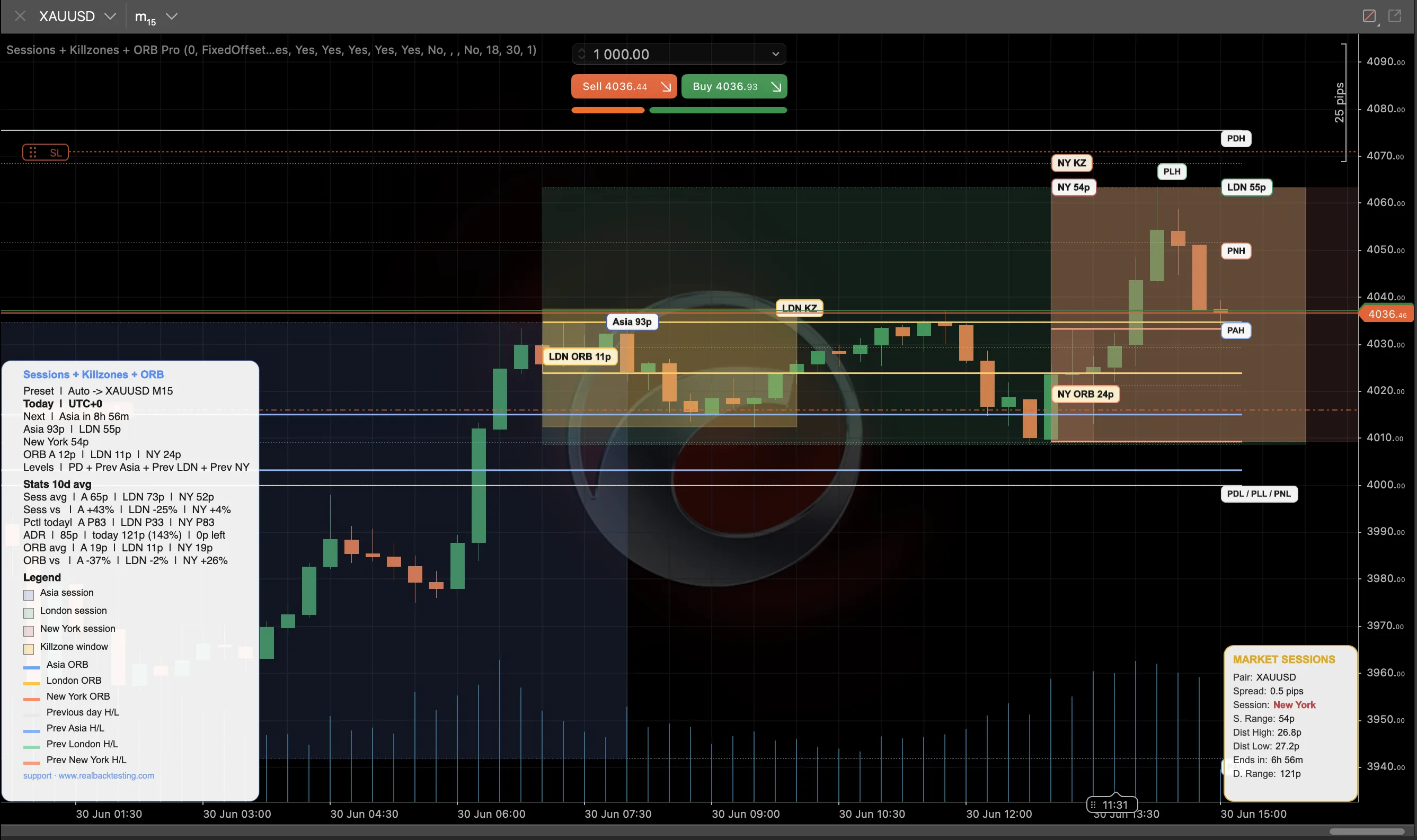 Enlarge screenshot ↗
Built for your workflow
For traders who organise their day around sessions and opening ranges.
Compare opening ranges and key levels.
Choose the layers and alerts you use.
See what you will use.
Complete screenshots. Open any image to inspect it at full size.
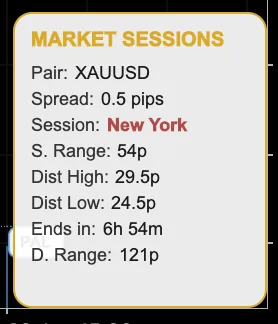
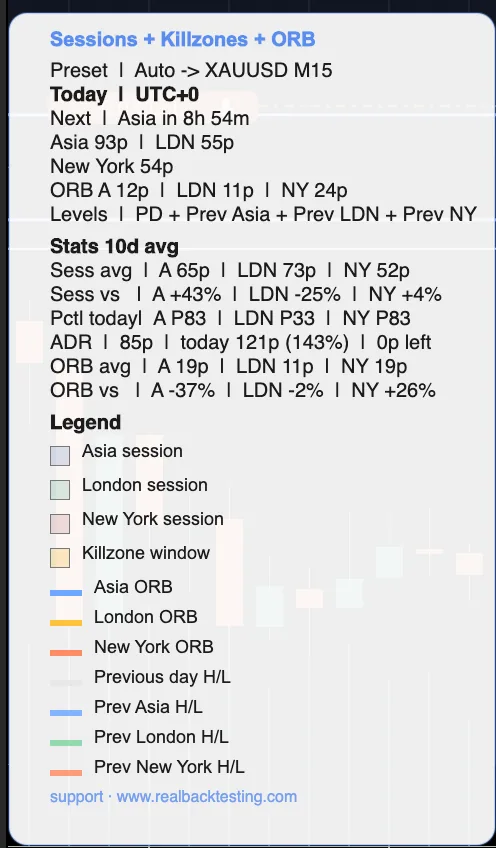
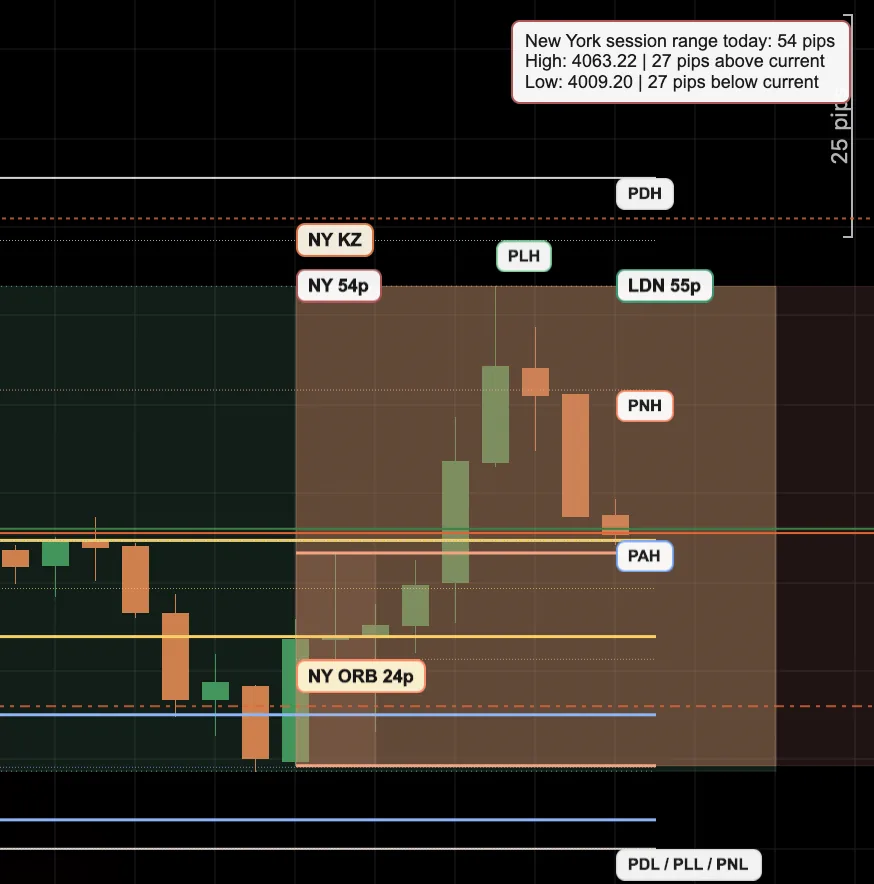
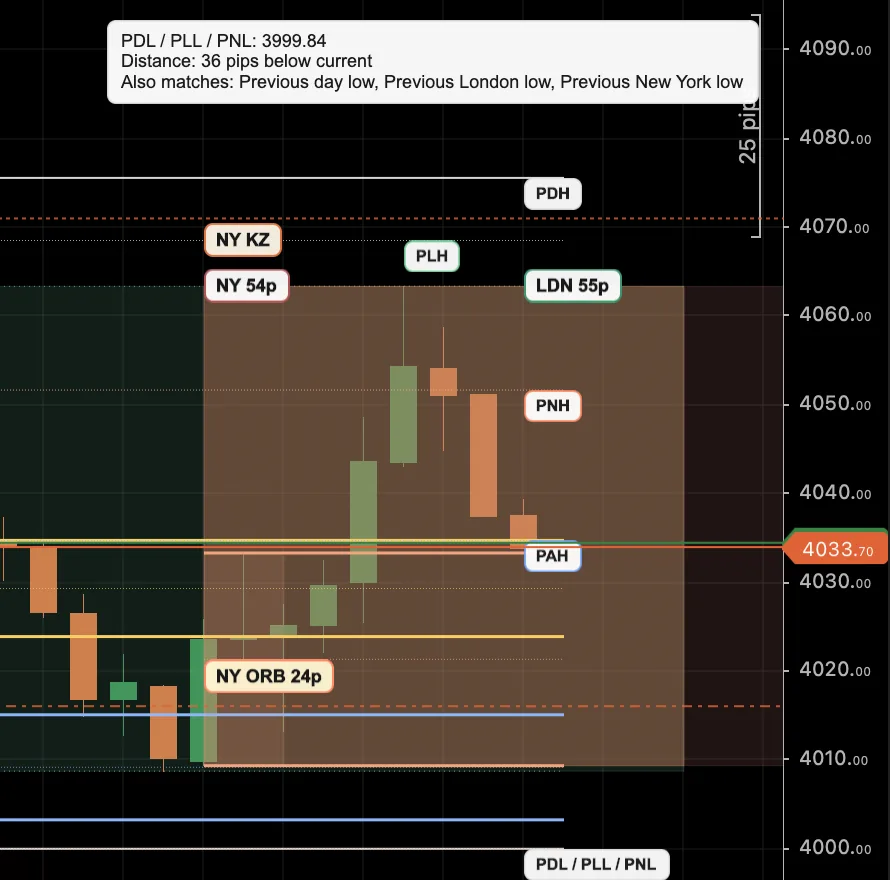
Choose your edition.
Start with the essentials.
Session map and the London opening range.
Go further in your workflow.
Multi-session ORBs, previous levels and more alerts.
Full feature comparison
Free vs Pro — clear differences
The Free is a clean, honest session map (plug-and-play). The Pro adds what turns the map into a decision tool: more ORBs, previous levels, stats and the full alert matrix.
| Capability | Free | Pro · $29 |
|---|---|---|
| Session structure | ||
| Asia / London / New York sessions (boxes + H/L) | Yes | Yes |
| ICT killzones (London + New York) | Yes | Yes |
| Opening Range (ORB) | London only | Multi-ORB: Asia + London + NY, minutes per ORB |
| Hide partial sessions · timeframe guard | Yes | Yes |
| Previous levels | ||
| Previous day H/L (PDH/PDL) | — | Yes |
| Previous session H/L (Asia/London/NY) | — | Yes |
| Previous week / month H/L (PWH/PWL · PMH/PML) | — | Yes |
| Context & stats | ||
| ATR context (pips / ATR multiple / both) | — | Yes |
| Range percentile · ADR used/left · day-of-week | — | Yes |
| Countdown to next session · market-context box | — | Yes |
| Alerts | ||
| Session open + ORB break (popup · sound · email) | Yes | Yes |
| Previous-level touch + approaching · ORB retest | — | Yes |
| Mobile push (native cTrader Price Alerts) | — | Yes |
| Common base | ||
| No-repaint · real DST + fixed offset · presets · themes · realbacktesting identity | Yes | Yes |
| Number of configurable parameters | 51 | 98 |
Getting started
Quick usage manual
From zero to a configured chart in five minutes.
Install the indicator in cTrader
From the cTrader Store, add Sessions + Killzones + ORB (Free or Pro). In cTrader: Indicators tab → find it → Add to the chart.
Pick a preset
Set Preset profile = Auto and it self-configures by symbol and timeframe (XAUUSD M15, US100 M15, EURUSD H1). For full control, use Manual.
Set your time
On a fixed offset, leave Session time mode = FixedOffset and set your Session TZ offset (e.g. +1 if you are UTC+1). To make each session follow its country's DST automatically, use ExchangeTimezone.
Turn on only what you use
Every block has its toggle: switch off the sessions you don't trade, keep just your killzone, choose which ORBs and previous levels you want. Clean defaults — add, don't clutter.
Enable your alerts (optional)
Set Alerts enabled = true and pick events (session open, ORB break, retest, level touch/approaching) and channels (popup, sound, email). For mobile push turn on Push price alerts (Pro) — it uses cTrader's native Price Alerts.
Read the panel
The overlay panel summarises the active session, range, percentile, ADR used/left and the countdown to the next session. Hover any historical label to see its detail.
Configuration
Parameter reference from the product documentation. Check names and options against your installed edition.
Configurable parameters — full reference
Everything is an independent toggle with clean defaults: each trader shapes their own chart. Rows tagged PRO exist only in the Pro edition; the rest are in both. Expand each group.
1 · General 21 params
| Parameter | Default | Values | What it does |
|---|---|---|---|
| Session time mode | FixedOffset | FixedOffset · ExchangeTimezone | Fixed UTC offset (classic) or a real timezone with automatic DST. |
| Session TZ offset (h) | 0 | −12..14 | Hour offset to anchor the sessions (FixedOffset mode). |
| Asia / London / NY timezone | Tokyo/London/NewYork | UTC·London·NewYork·Frankfurt·Tokyo | Per-session zone when ExchangeTimezone (automatic DST). |
| Day / levels timezone | NewYork | enum | Zone for the day rollover and the previous levels. |
| Preset profile | Auto | Auto·Manual·XAUUSD_M15·US100_M15·EURUSD_H1 | Active profile (Auto detects symbol + timeframe). |
| Theme | Dark | Dark · Light | Overlay colour palette. |
| Labels | Short | Full · Short · Off | Label detail level. |
| Lookback days | 5 | 1..20 | Number of days drawn (boxes / lines). |
| Label lookback days | 2 | 1..10 | Market days carrying historical labels. |
| Show overlay panel / info / legend | true | bool | Overlay panel, info block and legend. |
| Enable label details | true | bool | Hover tooltips on the labels. |
| Panel corner / X / Y | TopRight · 12 · 12 | enum · 0..120 | Overlay panel position. |
| Show market context box PRO | false | bool | Independent market-context box. |
| Market box corner / X / Y PRO | TopLeft · 12 · 12 | enum · 0..120 | Market box position. |
| Show premium stats PRO | true | bool | Premium stats block in the panel. |
| Stats lookback days PRO | 10 | 3..30 | Window for the stats averages. |
| Show percentile / countdown / ADR room / day-of-week PRO | true | bool | Pctl, Next, ADR and DoW rows of the premium panel. |
| Range display mode PRO | Pips | Pips · AtrMultiple · PipsAndAtr | Format of the displayed range. |
| ATR period / timeframe PRO | 14 · Daily | 2..100 · enum | Context ATR. |
| Show timeframe warning | true | bool | Warning if the timeframe is ≥ daily or larger than the ORB window. |
2 · Sessions 10 params
| Parameter | Default | Values | What it does |
|---|---|---|---|
| Show Asia / London / NY session | true | bool | Toggle per session. |
| Asia start / end hour | 0 / 8 | 0..23 / 1..24 | Asia window (local to its zone). |
| London start / end hour | 7 / 16 | 0..23 / 1..24 | London window. |
| New York start / end hour | 13 / 22 | 0..23 / 1..24 | New York window. |
| Show session high/low | true | bool | Master toggle for the session H/L lines. |
| Show Asia / London / NY H/L | true | bool | H/L toggle per session. |
| Session H/L draw mode | Classic | Classic · UntilPrint · FromPrint | How the H/L lines are drawn. |
| Extend session H/L to day end | true | bool | Projects the H/L to the end of day. |
| Hide partial sessions | true | bool | Hides the Sunday-open stub (<30% window coverage). |
3 · Killzones 5 params
| Parameter | Default | Values | What it does |
|---|---|---|---|
| Show ICT killzones | true | bool | Master toggle for killzones. |
| London killzone start / end | 7 / 10 | 0..23 / 1..24 | London KZ window. |
| New York killzone start / end | 13 / 16 | 0..23 / 1..24 | New York KZ window. |
4 · ORB 8 params
| Parameter | Default | Values | What it does |
|---|---|---|---|
| Show London ORB | true | bool | London opening range (the only one in Free). |
| Show Asia / NY ORB PRO | true | bool | Asia and New York opening ranges. |
| Asia / London / NY ORB minutes | 30 | 5..180 | Each ORB window (independent minutes). |
| Show ORB midpoint | true | bool | ORB midpoint line. |
| Extend ORB to day end | true | bool | Projects the ORB levels to the end of day. |
5 · Levels 7 params PRO
| Parameter | Default | What it does |
|---|---|---|
| Show previous day H/L | true | PDH / PDL of the last market day. |
| Show previous session H/L | true | Master toggle for previous-session levels. |
| Show previous Asia / London / NY H/L | true | Toggle per session family. |
| Show previous week H/L | false | PWH / PWL (with period cache). |
| Show previous month H/L | false | PMH / PML (with period cache). |
| Show previous level tags | true | PDH/PAH/PLH/PNH… tags with tooltip and price. |
6 · Alerts 14 params
| Parameter | Default | What it does |
|---|---|---|
| Alerts enabled | false | Master alerts toggle. |
| Alert on session open (+ Asia/London/NY) | true | Session-open alert per session. |
| Alert on ORB break (+ Asia/London/NY) | true | ORB-break alert per session. |
| Alert ORB break above / below | true / true | Break-direction filter. |
| ORB break alert mode | StateChange | StateChange or FirstBreakPerSidePerDay (anti-spam in whipsaw). |
| Alert on previous level touch (+ families) PRO | false | Alert when a previous level is touched. |
| Alert on approaching level + distance (pips) PRO | false / 5 | Alert as price comes within X pips of a level (before the touch). |
| Alert on ORB retest PRO | false | Alert when price returns to the ORB level after breaking it (1×/day/ORB). |
| Popup / Sound alerts | true / true | Local channels. |
| Email alerts + from / to | false / "" | 3rd channel (needs SMTP in cTrader → Settings → Advanced). |
| Push price alerts (mobile) for previous levels PRO | false | Creates native Price Alerts (mobile push) on PDH/PDL/… tagged “SKO”. |
7 · Style 3 params
| Parameter | Default | Values | What it does |
|---|---|---|---|
| Session opacity | 18 | 5..60 | Session-box opacity. |
| Killzone opacity | 30 | 5..80 | Killzone opacity. |
| Line thickness | 1 | 1..3 | Line thickness. |
Explore the other indicator
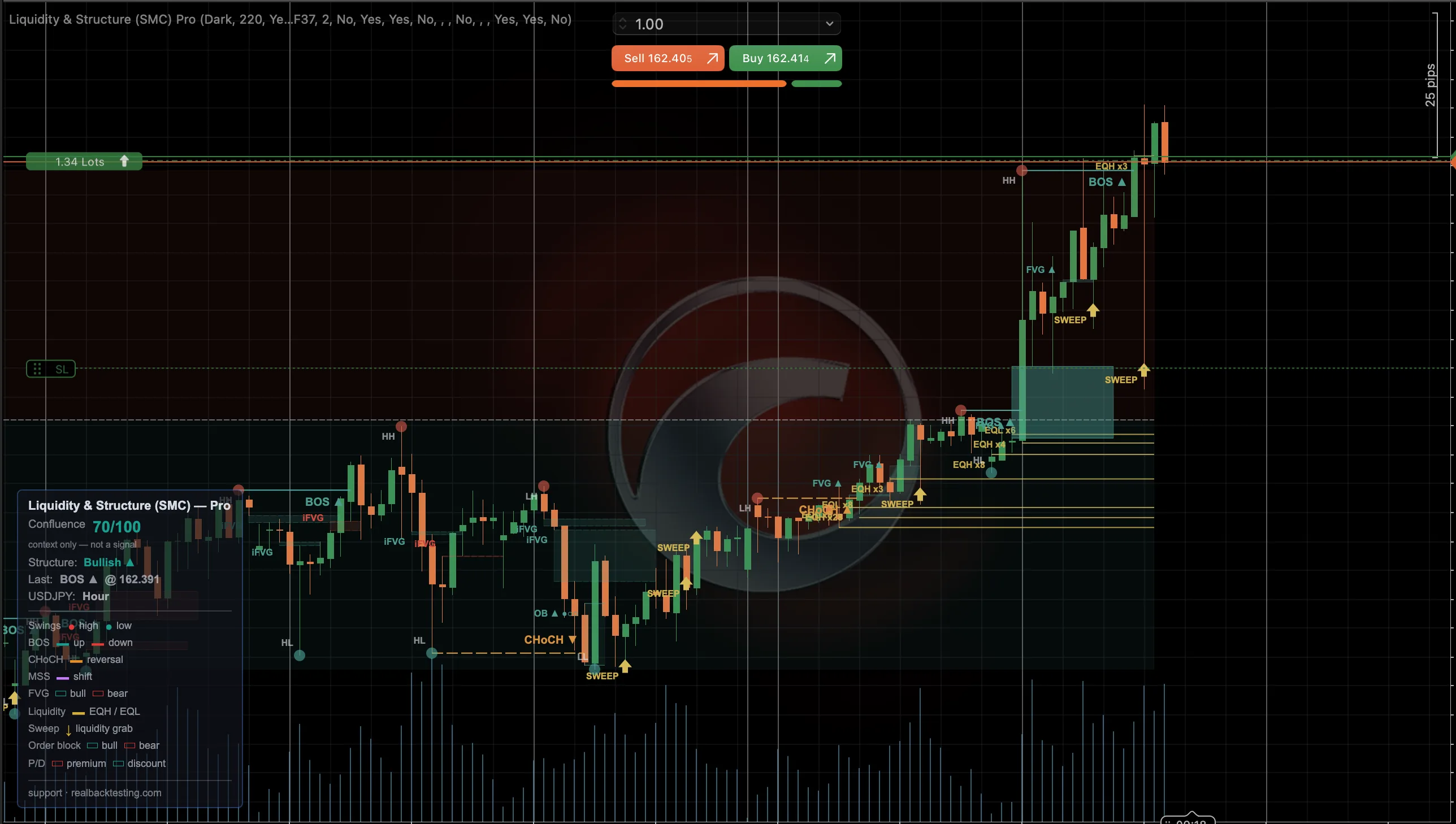 See screenshots ↗
Indicator · cTrader
Liquidity & Structure (SMC)
Market structure, liquidity and price imbalances in one overlay.
- Locate structure changes and liquidity sweeps.
- Explore FVGs, order blocks and their context.
Free · Pro from $29Explore ↗