Plugin · cTrader
Prop Firm Control
Keep your account rules in view.
Daily loss, drawdown and account progress in a single dashboard.
Free · Premium from $19 Confirm the current price in Store.
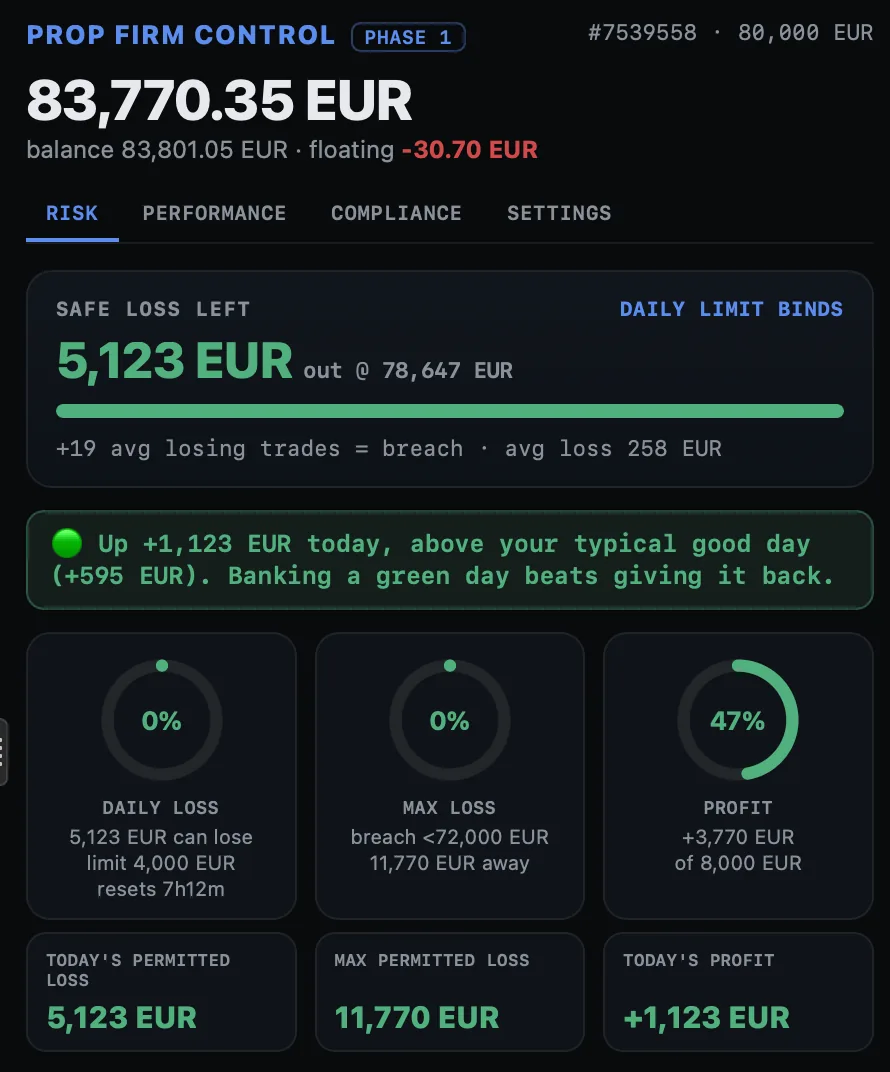 Enlarge screenshot ↗
Built for your workflow
For traders managing an account with specific loss and consistency rules.
Review trading days and consistency.
Add performance analysis and alerts in Premium.
See what you will use.
Complete screenshots. Open any image to inspect it at full size.
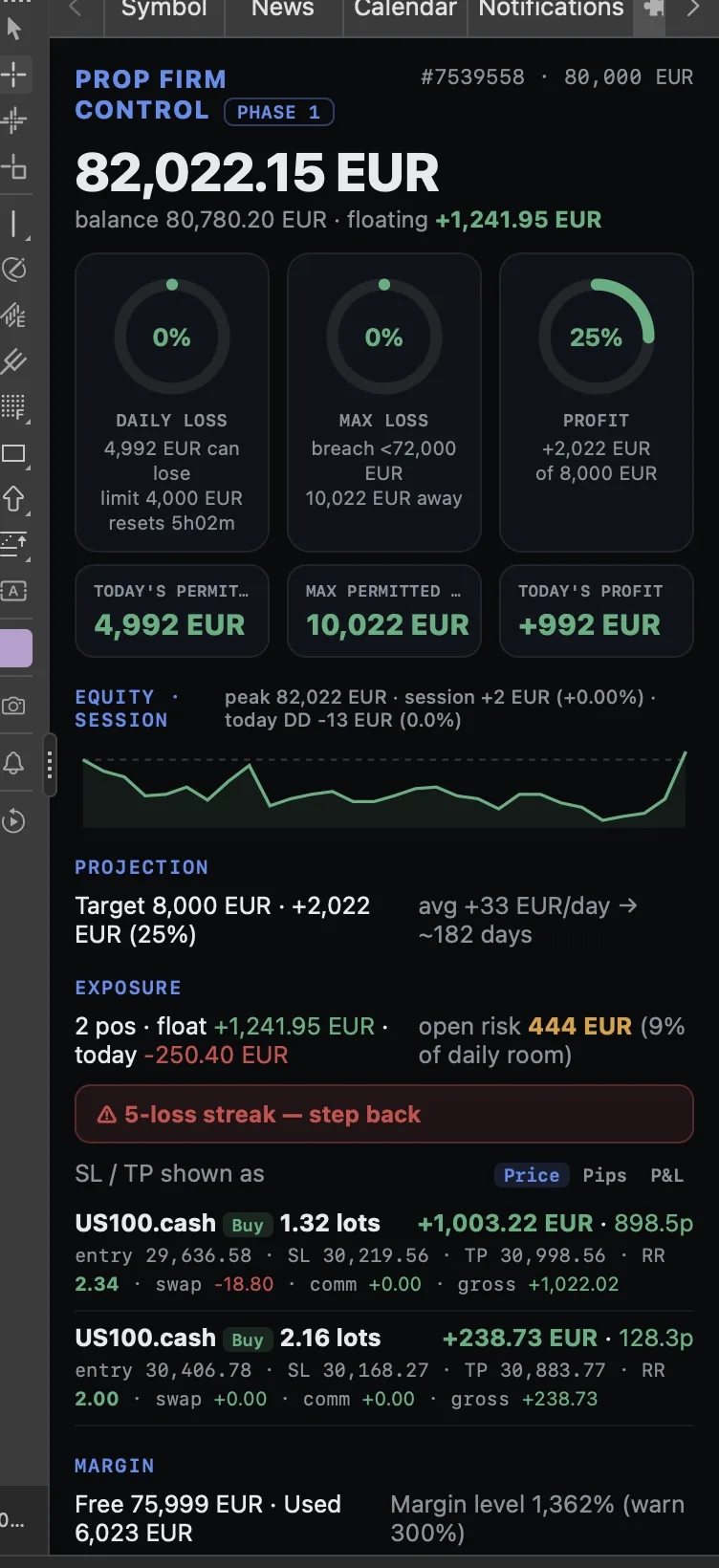
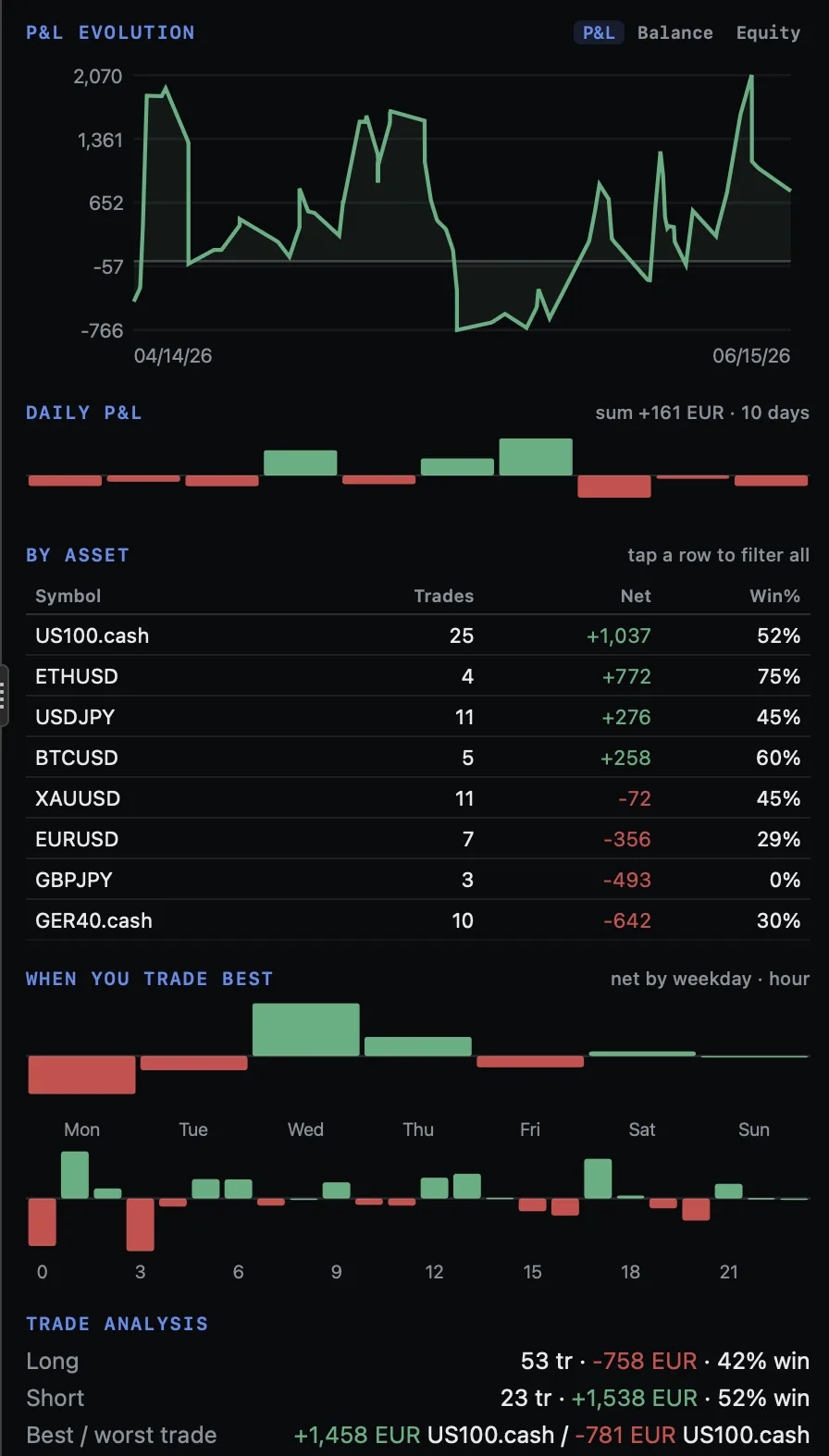
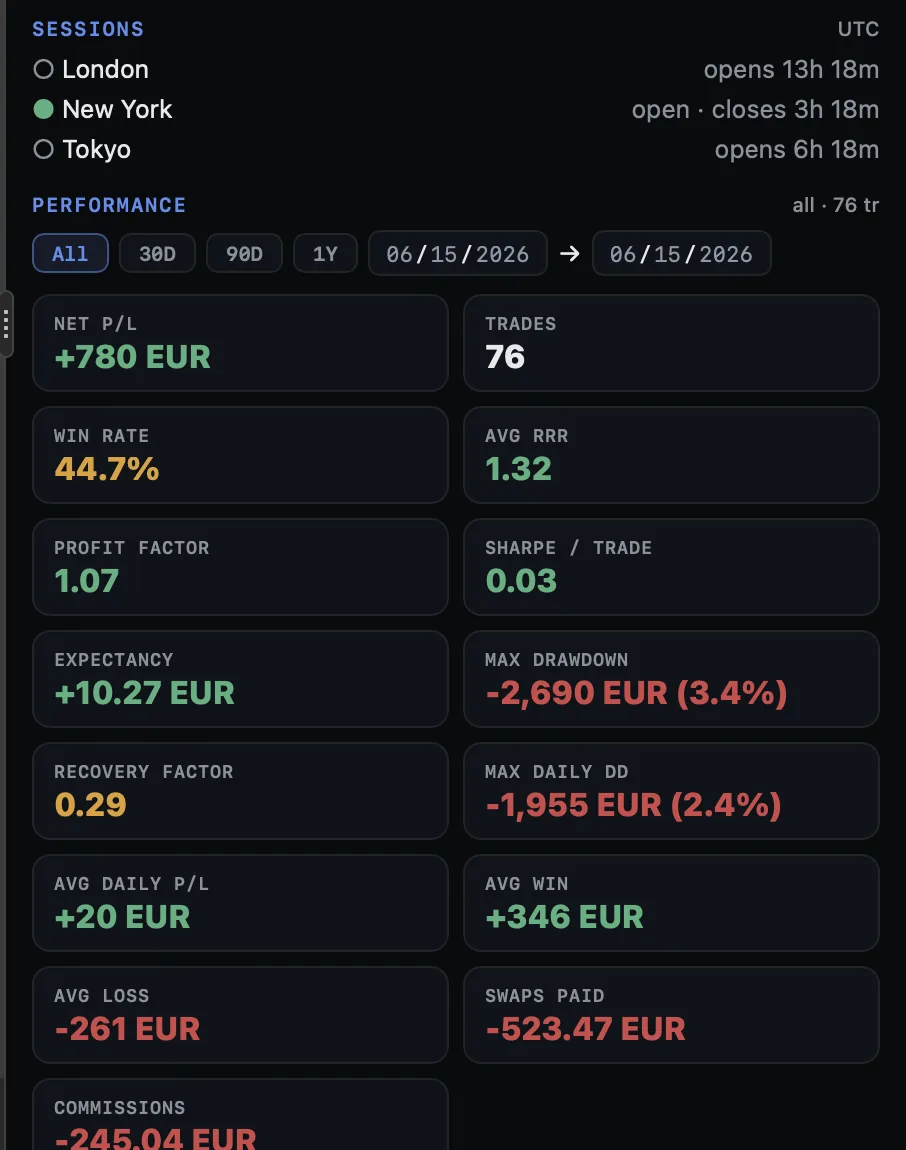
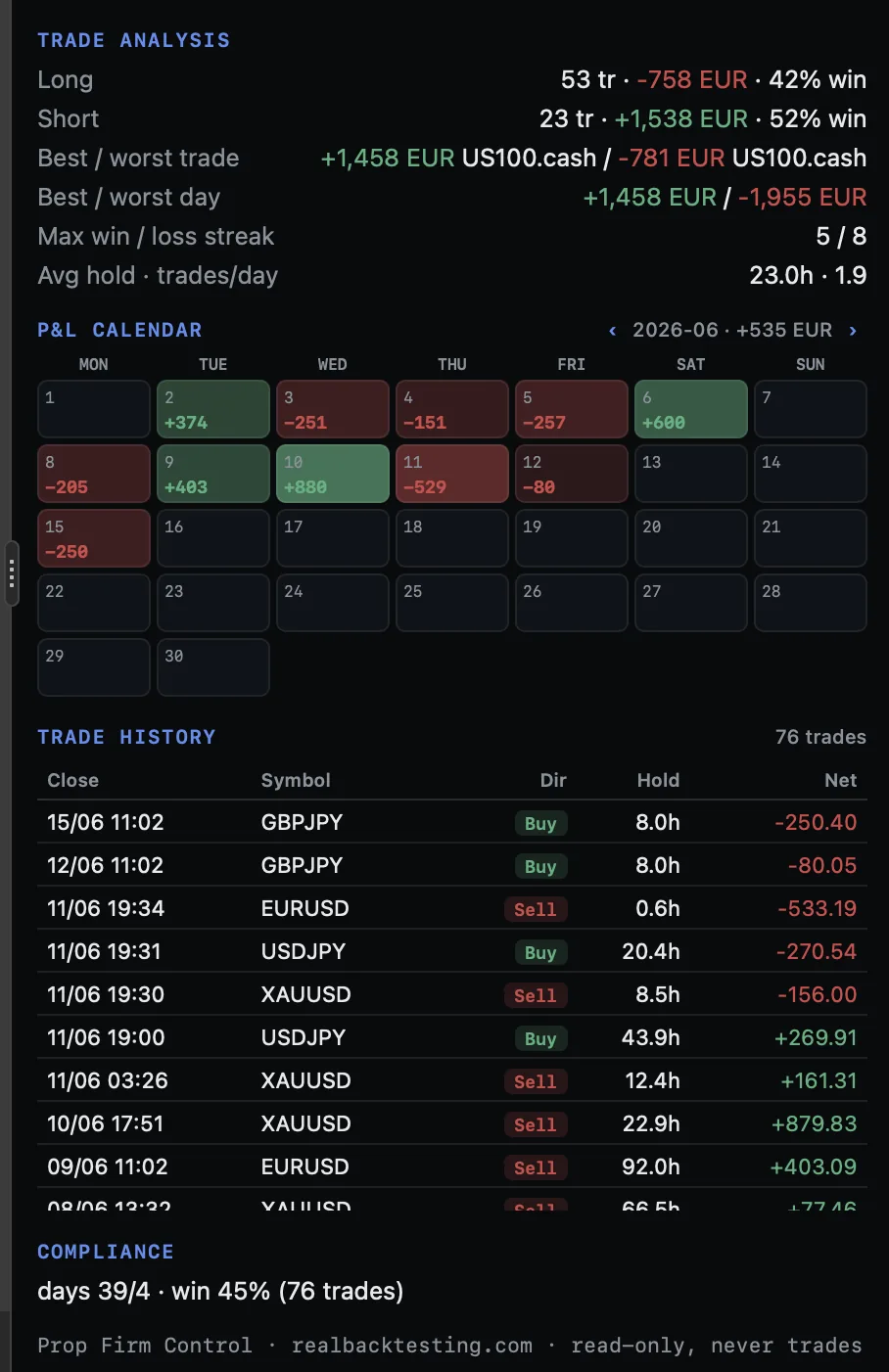
Choose your edition.
Start with the essentials.
Risk monitoring and the compliance dashboard.
Go further in your workflow.
Performance analysis and configurable alerts.
Full feature comparison
Free vs Premium — clear differences
The Free is a complete risk & compliance monitor (not a trial). Premium adds the performance analyzer and the alerts engine.
| Capability | Free | Premium |
|---|---|---|
| Risk tab (live) | ||
| Equity/balance/floating, daily·max·profit gauges, permitted-loss | Yes | Yes |
| Safe Loss Left + breach banner that names the rule | Yes | Yes |
| Trailing max-loss projector · exposure · per-position cards · margin · sessions | Yes | Yes |
| Stop-for-the-day / cool-off (non-blocking nudge) | Yes | Yes |
| Compliance tab | ||
| Get-paid scorecard + consistency governor + rule reconciliation | Yes | Yes |
| Trading days vs minimum · consistency · win rate · target progress + ETA | Yes | Yes |
| Performance tab (analyzer) | ||
| 16-KPI grid · P/L curve · daily bars · by-asset · by-day/hour | — | Yes |
| Trade analysis · monthly calendar · filterable history · 3 cross-filter layers | — | Yes |
| Alerts | ||
| Sound · popup · email on breach, warning, near-stop-out, streak, overtrade, naked-SL, target | — | Yes |
Getting started
Quick usage manual
Dock the cockpit and watch it compute your rules in two minutes.
Install the plugin
From the cTrader Store add Prop Firm Control (Free or Premium). It appears as a dockable WebView plugin; open it and anchor it wherever you like (it's resizable).
Pick your firm and phase
Set Firm preset = FTMO_Challenge (or whatever applies) and Challenge phase. That fills the rules; for another firm switch to Custom and edit the limits.
Set the start and timezone
Leave Initial balance = 0 (auto) unless you want to pin it. Set Reset hour and Timezone id to your firm's daily reset (blank = CE(S)T, FTMO's).
Set the drawdown mode
Choose Max DD mode for your account: Static, Trailing or TrailingLockAtInitial. The trailing projector only shows on trailing accounts.
Read the cockpit
Risk tab: watch Safe Loss Left and the gauges for how much room you have today. Compliance tab: the scorecard tells you if you're on track to get paid and what's blocking you.
Enable alerts (Premium)
In the Alerts group set your thresholds (warning %, streak, overtrade) and channels (sound/popup/email). Email uses your cTrader SMTP. Each alert fires once on crossing and re-arms itself.
Configuration
Parameter reference from the product documentation. Check names and options against your installed edition.
Configurable parameters — full reference (30)
Firm presets fill the rules in one click; every limit is editable for any prop firm. Expand each group.
1 · Account & preset 6 params
| Parameter | Default | Values | What it does |
|---|---|---|---|
| Title (account label) | Prop Firm Control | text | The big panel title. |
| Challenge phase | Phase1 | Phase1 · Phase2 · Funded | Sets the profit target (≈10% / ≈5% / payout when funded). |
| Firm preset (rule defaults) | FTMO_Challenge | FTMO_Challenge · _Verification · _Funded · Custom | One-click rule defaults (daily 5% / max 10% static); Custom = manual. |
| Initial balance (0 = auto) | 0 | ≥0 | Starting balance; 0 auto-detects it (balance − realised). |
| Min trading days (0 = off) | 4 | 0–60 | Minimum trading-days requirement shown in Compliance. |
| Consistency limit % (0 = off) | 0 | 0–100 | Consistency cap (best day as % of profit). |
2 · Profit / payout target 2 params
| Parameter | Default | Values | What it does |
|---|---|---|---|
| Target mode | PctOfInitial | PctOfInitial · Amount · Off | How the target is expressed. |
| Target value | 10 | ≥0 | Target value (profit, or payout when funded). |
3 · Daily loss 7 params
| Parameter | Default | Values | What it does |
|---|---|---|---|
| Daily basis | PctOfInitial | PctOfInitial · PctOfDayStartBalance · Amount | How the daily limit is computed. |
| Daily value | 5 | ≥0.1 | Daily-loss limit magnitude. |
| Daily reference | MaxOfBoth | DayStartBalance · DayStartEquity · MaxOfBoth | Day-start anchor (balance, equity or the higher — FTMO-style). |
| Include floating in daily | true | bool | Count open floating P&L toward the daily loss (as firms do). |
| Reset hour / minute | 0 / 0 | 0–23 / 0–59 | Hour/minute the trading day rolls over. |
| Timezone id (blank = CE(S)T) | "" | e.g. Europe/London | Zone driving the daily reset and all displayed times. |
4 · Max loss 4 params
| Parameter | Default | Values | What it does |
|---|---|---|---|
| Max basis | PctOfInitial | PctOfInitial · Amount | Max-loss limit as % of initial or fixed amount. |
| Max value | 10 | ≥0.1 | Max-loss limit magnitude. |
| Max DD mode | Static | Static · Trailing · TrailingLockAtInitial | Static floor, trailing, or trailing-then-lock-at-initial. |
| Trailing basis | LiveEquityPeak | LiveEquityPeak · EndOfDayBalancePeak | What the trailing floor trails off. |
6 · Alerts 10 params PREMIUM
| Parameter | Default | Values | What it does |
|---|---|---|---|
| Warn at % of DAILY limit | 70 | 10–100 | Daily-loss warning threshold. |
| Warn at % of MAX limit | 70 | 10–100 | Max-loss warning threshold. |
| Stop-out warn level % (margin) | 300 | 50–5000 | Margin level at which the near-stop-out alert fires. |
| Loss-streak alert (trades) | 4 | 2–20 | Consecutive losers that trigger the streak alert. |
| Overtrade alert (×avg/day) | 2.0 | 1.2–10 | Multiple of average daily trades that triggers overtrade. |
| Cool-off minutes after loss streak v1.1 | 20 | 0–240 | Length of the post-streak cool-off countdown. |
| Email alerts to / from (blank = off) | "" | Alert email recipient/sender (Gmail requires it to match the account). | |
| Sound / Popup alerts | true / true | bool | Local alert channels. |
7 · Display 1 param
| Parameter | Default | Values | What it does |
|---|---|---|---|
| Daily P&L chart days | 12 | 3–60 | How many days the daily P/L mini chart shows. |
Explore the other plugin
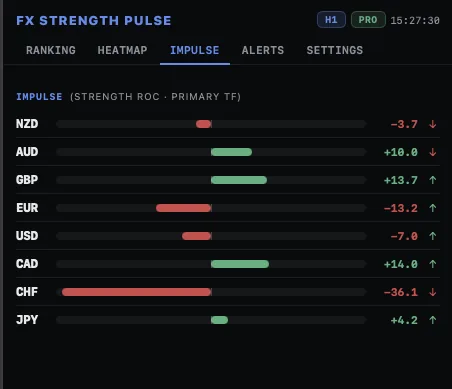 See screenshots ↗
Plugin · cTrader
FX Strength Pulse
Currency strength, pair comparison and multi-timeframe context.
- Compare eight major currencies.
- Explore 28 pairs in the Pro heatmap.
Free · Pro from $29Explore ↗